Angular + .NET boilerplate
Full-stack základ s Dockerom
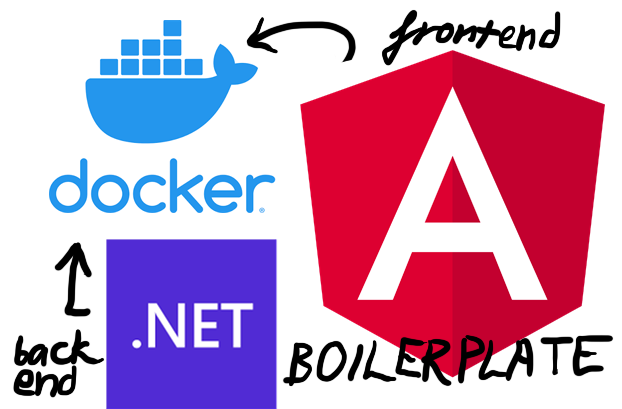
Otestovaná šablóna: Angular frontend, .NET C# backend, Docker a Nginx reverse proxy, aby oba bežali cez jeden port.
- Odbory
- Záujmy
- Jazyk
- Rok
- 2025 · posledný push 2025-10-23
- GitHub
- 0 (2026-11-07)
README
Priamo z GitHub repozitára projektu. (2026-11-07) · GitHub
Angular + C# .NET + Docker + Postgres + Nginx Boilerplate
A tested working boilerplate template for modern full-stack web applications with Angular frontend, C# .NET backend, Docker containerization, and Nginx reverse proxy for singular frontend + backend port/domain access.
🔗 Original Repository: https://github.com/iairu/angular-dotnet-docker-boilerplate
📌 Service Versions
- Angular: 20.x
- Node.js: 22.x (Alpine LTS)
- C# .NET: 8.0
- ASP.NET Core: 8.0
- PostgreSQL: 18.0 (Alpine)
- Nginx: 1.28.0 (Alpine Stable)
🚀 What's Included
This boilerplate provides a foundation with:
- Frontend: Angular with Axios for API communication with demo Hello World GET
- Backend: ASP.NET Core (C#) with a demo Hello World REST API endpoint
- Containerization: Docker with Docker Compose that includes all services (frontend, backend, reverse proxy)
- Reverse Proxy: Nginx for routing and load balancing
- CI/CD Demo: GitHub Actions workflow example for automated Github Pages deployment of a static API export
- Static Hosting: GitHub Pages integration for static builds
📋 Prerequisites
🛠 Quick Start
1. Clone the Repository
git clone https://github.com/iairu/angular-dotnet-docker-boilerplate.git
cd angular-dotnet-docker-boilerplate
2. Launch with Docker
Option A: Using Quick Start Script (Recommended)
# Make the script executable
chmod +x quick-start.sh

# Run it
./quick-start.sh
Option B: Manual Docker Commands
# Start all services
docker compose up

# Or rebuild and start (useful after code changes)
docker compose build --no-cache
docker compose up
Option C: Fresh Database Start (If you encounter database issues)
# Stop containers and remove old database
docker compose down
docker volume rm angular-dotnet-docker-demo_postgres-data

# Start fresh
docker compose up --build
3. Access Your Application
- Frontend: http://localhost (Angular app routed through Nginx)
- Backend API: http://localhost/api (.NET REST endpoints routed through Nginx)
- Direct Backend: http://localhost:8080 (.NET server, must uncomment ports in docker-compose.yml)
🏗 Project Structure
├── frontend-angular/         # Angular frontend application
├── backend-csharp-dotnet/    # ASP.NET Core backend application
├── nginx-reverse-proxy/      # Nginx configuration for reverse proxy
├── .github/workflows/        # GitHub Actions CI/CD pipeline
├── docker-compose.yml        # Multi-container orchestration
├── .env.local.example       # Environment variables template
└── README.md                # This file
🔧 Development Workflow
Local Development
Quick Restart
Often used after minor config changes, inconsistencies, or computer reboot:
# Turn off
docker compose down

# Stop and remove all remaining Docker containers and networks (adjust prefix if needed)
docker stop $(docker ps -a -q -f name=angular-dotnet-) ; docker rm -f $(docker ps -a -q -f name=angular-dotnet-) ; docker network rm $(docker network ls -q -f name=angular-dotnet_)

# Turn on again
docker compose up -d
One-line restart command (recommended to add to .bashrc as an alias):
docker compose down ; docker stop $(docker ps -a -q -f name=angular-dotnet-) ; docker rm -f $(docker ps -a -q -f name=angular-dotnet-) ; docker network rm $(docker network ls -q -f name=angular-dotnet_) ; docker compose up -d
Full Rebuild
Use after major changes (especially if package.json or .csproj changed):
# Turn off
docker compose down

# Stop and remove all remaining Docker containers and networks
docker stop $(docker ps -a -q -f name=angular-dotnet-) ; docker rm -f $(docker ps -a -q -f name=angular-dotnet-) ; docker network rm $(docker network ls -q -f name=angular-dotnet_)

# Rebuild without cache (important!)
docker compose build --no-cache

# Turn on
docker compose up -d
One-line rebuild command (recommended to add to .bashrc as an alias):
docker compose down ; docker stop $(docker ps -a -q -f name=angular-dotnet-) ; docker rm -f $(docker ps -a -q -f name=angular-dotnet-) ; docker network rm $(docker network ls -q -f name=angular-dotnet_) ; docker compose build --no-cache ; docker compose up -d
Selective Service Rebuild
# Rebuild specific service
docker compose build --no-cache backend
docker compose build --no-cache frontend
docker compose build --no-cache nginx

# Restart only nginx after config changes
docker compose stop nginx && docker compose build nginx && docker compose up -d nginx
View Logs
# View all logs
docker compose logs -f

# View logs for specific service
docker compose logs -f backend
docker compose logs -f frontend
docker compose logs -f postgres

# View logs for specific container by ID
docker logs <container_id>
Stop Services
# Stop all services (keeps containers)
docker compose stop

# Stop and remove all services
docker compose down
Nuclear Option - Complete Docker Reset
⚠️ WARNING: This will remove ALL containers and images on your machine, not just this project!
Consider backing up other containers first!
# Stop and remove all Docker containers, then remove all images
docker stop $(docker ps -a -q) ; docker rm -f $(docker ps -a -q) ; docker rmi $(docker images -q)

# Remove all volumes and networks
docker system prune -a --volumes --force

# Start fresh
docker compose up -d
Debugging Commands
# List all containers (running and stopped)
docker container ls -a

# Get bash shell in a container
docker exec -it <container-name> /bin/bash

# If bash is not available, try sh
docker exec -it <container-name> /bin/sh

# Inspect container details
docker inspect <container-name>

# Check Docker disk usage
docker system df
Making Changes
- Frontend changes: Edit files in
frontend-angular/ - Backend changes: Edit files in
backend-csharp-dotnet/ - Nginx config: Edit
nginx-reverse-proxy/nginx.conf - Rebuild affected containers and restart
🚀 Deployment
GitHub Pages (Automatic)
The repository includes GitHub Actions that automatically:
- Builds the application on push to
main - Generates static files using Docker
- Deploys to GitHub Pages
Manual Deployment
# Production build
docker compose -f docker-compose.prod.yml up --build

# Or deploy to your preferred hosting service
🔌 API Integration
The frontend uses Axios to communicate with the .NET backend:
// Example API call (already implemented)
import axios from 'axios';

const response = await axios.get('/api/hello.json');
console.log(response.data);
Backend provides REST endpoints:
// Example controller (already implemented)
[ApiController]
[Route("api")]
public class HelloController : ControllerBase
{
    [HttpGet("hello")]
    public IActionResult Hello()
    {
        return Ok("Hello from .NET!");
    }

    [HttpGet("users")]
    public async Task<ActionResult<List<User>>> GetAllUsers()
    {
        return await _context.Users.ToListAsync();
    }
}
🔧 Customization
Adding New API Endpoints
- Add controller methods in
backend-csharp-dotnet/Controllers/ - Rebuild backend:
docker compose build --no-cache backend - Call from frontend using Axios
Adding Frontend Components
- Add Angular components in
frontend-angular/src/app/ - Update routing as needed
- Rebuild frontend:
docker compose build --no-cache frontend
Environment Configuration
Environment variables are optional but available for customization:
Copy the example file:
cp .env.local.example .env.localEdit your settings in
.env.local:# .env.local NG_APP_API_URL=http://localhost/api ASPNETCORE_ENVIRONMENT=DevelopmentEnable in Docker by uncommenting the
env_fileandenvironmentlines indocker-compose.yml
The boilerplate works perfectly without any environment configuration!
📦 Technology Stack
- Frontend: Angular, TypeScript, Axios, Angular Material/CSS
- Backend: ASP.NET Core, C# 8.0, Entity Framework Core
- Database: PostgreSQL 18 (Alpine) with automatic schema management
- Containerization: Docker, Docker Compose
- Web Server: Nginx (reverse proxy)
- CI/CD: GitHub Actions
- Hosting: GitHub Pages, Docker-compatible platforms
🗄️ Database Features
- PostgreSQL Integration: Fully configured with connection pooling
- Entity Framework Core: Automatic migrations and schema management
- Sample Entity: User entity with CRUD operations
- Health Checks: Database connectivity monitoring
- Security: Database only accessible within Docker network
- Persistence: Data persisted in Docker volumes
- Auto-Recovery: Automatic detection and repair of corrupted migration state
Available API Endpoints
GET /api/users- List all usersPOST /api/users- Create new userGET /api/users/{id}- Get user by IDGET /api/users/count- Get user countGET /api/health- Database health check
🔧 Migration Verification System
The application includes an intelligent migration verification system that prevents the common "relation does not exist" error:
How it works:
- On startup, verifies that all expected database tables actually exist
- If tables are missing (corrupted migration state), automatically:
- Drops the migration history table
- Reapplies all migrations from scratch
- Verifies tables were created successfully
- Provides clear logging of the entire process
Expected startup logs (healthy database):
🔍 Verifying database schema and migrations...
✅ Table 'users' exists
✅ All expected tables exist in database
✅ Database migrations verified and up to date
Recovery logs (corrupted database):
🔍 Verifying database schema and migrations...
⚠️ Table 'users' does not exist in database
❌ Database schema is incomplete. Missing tables: users
🔄 Resetting migration history and reapplying all migrations...
✅ All migrations reapplied successfully
✅ Verified: Table 'users' now exists
Testing the auto-recovery feature:
# Run the test script
chmod +x test-migration-fix.sh
./test-migration-fix.sh
For more details, see MIGRATION_FIX_README.md
🐛 Troubleshooting
Common Issues
"Relation 'users' does not exist" Error:
✅ FIXED AUTOMATICALLY - The application now auto-detects and repairs this issue!
If you still see this error:
# Option 1: Let the app auto-recover (recommended)
docker compose restart backend
# Watch the logs - you'll see the recovery process
docker compose logs -f backend

# Option 2: Fresh database start
docker compose down
docker volume rm angular-dotnet-docker-demo_postgres-data
docker compose up --build

# Option 3: Use the quick start script
./quick-start.sh
Port conflicts:
# Check what's using port 80
sudo lsof -i :80
# Kill conflicting processes or change ports in docker-compose.yml
Container build fails:
# Clean Docker cache
docker system prune -a
# Rebuild from scratch
docker compose build --no-cache --pull
Database connection issues:
# Check PostgreSQL logs
docker compose logs postgres
# Check backend connection logs
docker compose logs backend
# Verify database health
curl http://localhost:8080/health
API calls fail:
- Check Nginx configuration in
nginx-reverse-proxy/nginx.conf - Verify backend is running:
docker compose logs backend - Ensure CORS is configured in ASP.NET Core
- Test database connectivity:
curl http://localhost:8080/health
Migration issues persist:
# View detailed migration logs
docker compose logs backend | grep -A 10 "Verifying database schema"

# Manually inspect database
docker compose exec postgres psql -U boilerplate_user -d boilerplate_db
\dt  # List all tables
\d users  # Show users table structure
🤝 Contributing
- Fork the repository
- Create a feature branch:
git checkout -b feature-name - Make your changes
- Test with
docker compose up - Submit a pull request
📄 License
This project is licensed under the MIT License - see the LICENSE file for details.
Happy coding! 🚀 If you find this boilerplate helpful, please give it a star ⭐