Glagolitic converter
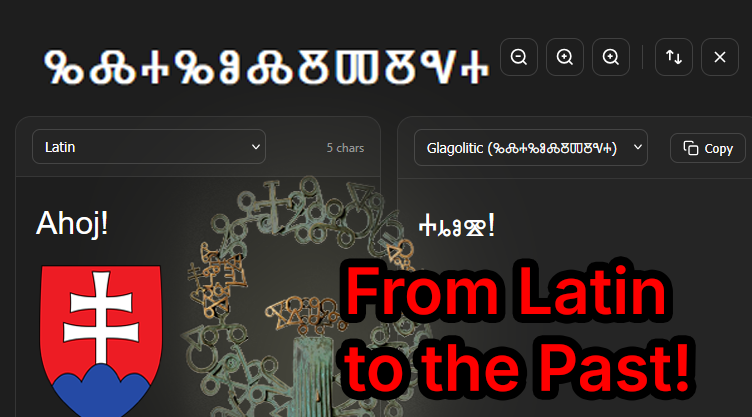
Latin to Glagolitic script
A converter between Latin and Glagolitic script, the oldest Slavic alphabet, built with Svelte.
- Fields
- Interests
- Language
- Year
- 2026 · last push 2026-03-31
- GitHub
- 0 (2026-11-07)
README
Straight from the project’s GitHub repository. (2026-11-07) · GitHub
ⰃⰎⰀⰃⰑⰎⰋⰕⰋⰜⰀ - Glagolitic Converter
A beautiful, native desktop application for converting text between Latin, Glagolitic, and Syriac (Aramaic) scripts. Built with Tauri 2.0 and SvelteKit, featuring a clean interface that adapts to macOS light and dark mode.




✨ Features
- 🔄 Multi-Script Support - Convert between Latin, Glagolitic, and Syriac (Aramaic) scripts
- ⌨️ Native Keybindings - Keyboard shortcuts for power users
- 🎨 Clean UI - Minimal interface that adapts to macOS light/dark mode
- 🌐 Cross-Platform - Native builds for macOS (Intel & Apple Silicon), Windows, and Linux
- 📋 Quick Copy - One-click copy of converted text
- 🔄 Swap Languages - Easily switch between input/output languages
- 🔍 Accessibility Zoom - Adjustable text size with keyboard shortcuts
- 🌙 Dark Mode - Automatic switching based on system preference
⌨️ Keyboard Shortcuts
| Shortcut | Action |
|---|---|
⌘K / Ctrl+K |
Convert text |
⌘⇧X / Ctrl+Shift+X |
Swap languages |
⌘⌫ / Ctrl+Backspace |
Clear all text |
⌘C / Ctrl+C |
Copy output (when output focused) |
⌘+ / Ctrl++ |
Zoom in (increase text size) |
⌘- / Ctrl+- |
Zoom out (decrease text size) |
⌘0 / Ctrl+0 |
Reset zoom to default |
🚀 Installation
macOS
Apple Silicon (M1/M2/M3)
# Download the .dmg from Releases
# Or build locally:
npm run tauri build --target aarch64-apple-darwin
Intel Macs
# Download the .dmg from Releases
# Or build locally:
npm run tauri build --target x86_64-apple-darwin
Universal Binary (Both architectures)
npm run tauri build
Windows
# MSI Installer
npm run tauri build --target x86_64-pc-windows-msvc

# NSIS Installer (.exe)
npm run tauri build
Linux
# AppImage (recommended)
npm run tauri build --target x86_64-unknown-linux-gnu

# DEB package (Debian/Ubuntu)
npm run tauri build

# RPM package (Fedora/RHEL)
npm run tauri build
🛠️ Development
Prerequisites
- Node.js 18+
- Rust 1.70+
- Platform-specific dependencies:
- macOS: Xcode Command Line Tools
- Windows: Visual Studio C++ Build Tools
- Linux: See Tauri Linux prerequisites
Setup
# Clone the repository
git clone https://github.com/yourusername/glagolitic-app.git
cd glagolitic-app

# Install dependencies
npm install

# Start development server
npm run tauri dev
Build Commands
# Build frontend only
npm run build

# Build for current platform
npm run tauri build

# Build for specific platform
npm run tauri build --target <target-triple>
Available Targets
| Target Triple | Platform |
|---|---|
x86_64-apple-darwin |
macOS Intel |
aarch64-apple-darwin |
macOS Apple Silicon |
x86_64-pc-windows-msvc |
Windows 64-bit |
x86_64-unknown-linux-gnu |
Linux 64-bit |
📦 Project Structure
glagolitic-app/
├── src/                    # SvelteKit frontend
│   ├── lib/
│   │   └── converter.js    # Conversion logic
│   └── routes/
│       └── +page.svelte    # Main UI component
├── src-tauri/              # Tauri backend (Rust)
│   ├── src/
│   │   ├── main.rs
│   │   └── lib.rs
│   ├── icons/              # App icons
│   ├── Cargo.toml
│   └── tauri.conf.json
├── .github/
│   └── workflows/          # CI/CD pipelines
└── package.json
🎨 Design
The application features a clean, minimal design that adapts to your system appearance:
- Light Mode - Pure white background with black text
- Dark Mode - Dark background (#1e1e1e) matching macOS with white text
- Native Feel - System-like appearance and keybindings
- Responsive - Adapts to different window sizes
- Accessible - Adjustable text size from 12px to 32px
🔄 Glagolitic Script Support
The converter supports the full range of Glagolitic characters:
Uppercase
Latin:  A B V G D E Ž Z I J K L M N O P R S T U F H C Č Š Y Ě Ę Ū Ŏ
Glag:   Ⰰ Ⰱ Ⰲ Ⰳ Ⰴ Ⰵ Ⰶ Ⰷ Ⰹ Ⰺ Ⰽ Ⰾ Ⰿ Ⱀ Ⱁ Ⱂ Ⱃ Ⱄ Ⱅ Ⱆ Ⱇ Ⱈ Ⱌ Ⱍ Ⱎ Ⱏ Ⱑ Ⱗ Ⱚ Ⱛ
Lowercase
Latin:  a b v g d e ž z i j k l m n o p r s t u f h c č š y ě ę ū ŏ
Glag:   ⰰ ⰱ ⰲ ⰳ ⰴ ⰵ ⰶ ⰷ ⰹ ⰺ ⰽ ⰾ ⰿ ⱀ ⱁ ⱂ ⱃ ⱄ ⱅ ⱆ ⱇ ⱈ ⱌ ⱍ ⱎ ⱏ ⱡ ⱦ Ⱬ ⱬ
🤝 Contributing
- Fork the repository
- Create a feature branch (
git checkout -b feature/amazing-feature) - Commit your changes (
git commit -m 'Add amazing feature') - Push to the branch (
git push origin feature/amazing-feature) - Open a Pull Request
📄 License
This project is licensed under the MIT License - see the LICENSE file for details.
🙏 Acknowledgments
- Glagolitic script - The oldest known Slavic alphabet
- Tauri - Build smaller, faster, and more secure desktop applications
- Svelte - Cybernetically enhanced web apps
📞 Support
If you have any questions or issues, please open an issue on the GitHub repository.
Made with ❤️ for preserving Slavic heritage