twodolisty
To-do list for macOS and web
A to-do list application for macOS and the web built with Svelte and Tauri.
- Fields
- Interests
- Language
- Year
- 2026 · last push 2026-03-12
- GitHub
- 1 (2026-11-07)
README
Straight from the project’s GitHub repository. (2026-11-07) · GitHub

twodolisty
Todo List Application for macOS and Web.
Windows, Linux, iOS coming soon.
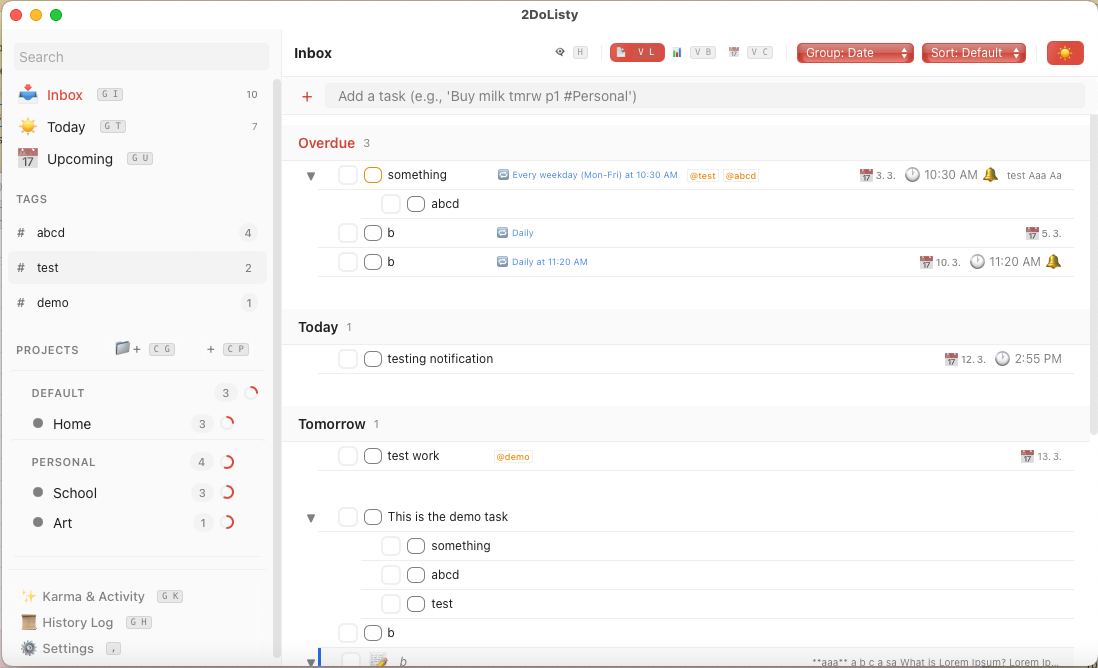
Built with ❤️ using Tauri and Svelte.
Features
🎯 Core Task Management
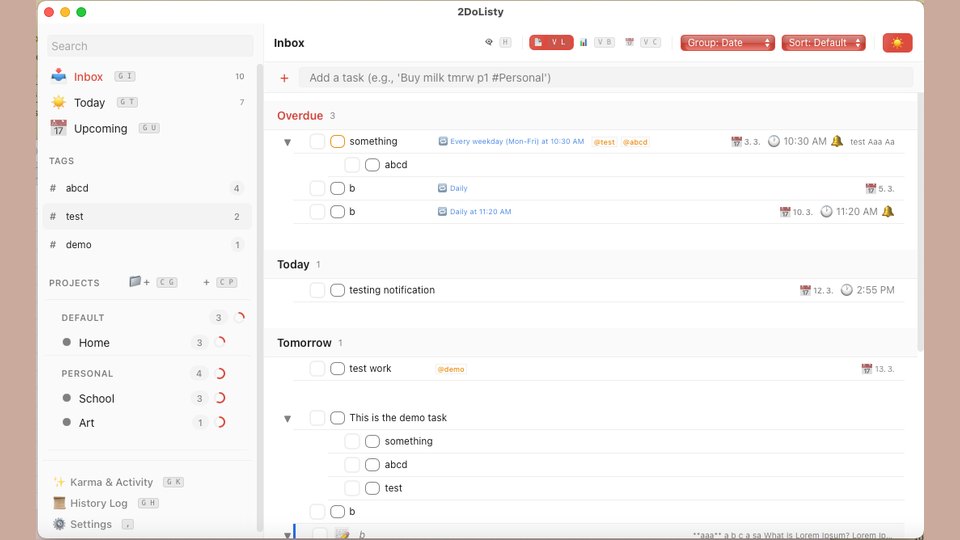
Quick Add: Fast task creation with auto-focus, supporting Q-button keybind and inline additions.
Nested Architecture: Support for infinite subtasks, grouped under parent tasks.
Rich Task Details:
Markdown support for inline text editing.
Custom fields permanently visible in the task modal per project.Tagging system with
dedicated tag pages andsidebar multi-tag filtering.Comment section for tasks (with inline search and deletion).
Attachments: Upload,
rename,and preview attachments directly within tasks.Priority Levels: Visual P1 (Red), P2 (Orange), P3 (Blue) priority indicators for tasks
and notes.Task-to-Note Conversion: Prepending a task with
!removes the checkbox and turns it into a standard text note.Bulk Actions: Multi-select tasks to perform bulk movements (between projects/sections) or bulk deletions including subtasks.
📅 Advanced Scheduling & Recurrence
Smart Recurrence Syntax: * Repeat every n days/weeks/months. Not fully tested.
Specific weekday toggles (Mon-Sun).
Specific time-of-day support (e.g., "7am").
Stop date configuration.
Auto-scheduling of the next instance upon completion.
Time Management: Due dates and specific time inputs managed via a robust context menu and date picker.
🗂 Organization & Views
Hierarchy: Tasks → Sections → Projects → Project Groups (with a mandatory "Default" group).
Multiple App Views:
List View: Traditional vertical task list.
Kanban (Board) View: Scrollable columns based on sections/projects, with seamless switching from the List view.
Calendar View: Switchable between Month view and WIP Week view (with specific hourly time slots and pinned all-day tasks).
Smart Views: Inbox, Today (with overdue tasks), and Upcoming.
Sorting & Grouping: Group tasks by Date, Project, Section, Priority, or None. Sort tasks manually or automatically.
🧠 Advanced Task Modal & Mindmap
- Interactive Tabs: Dedicated tabs for Description (Markdown), Mindmap with MAIN+SUB task nodes, Subtasks, and Comments.
- Node-Based Mindmap: * Infinite, draggable, and zoomable area.
- Main node (undeletable, synced with task title).
- Subtask nodes (auto-synced with subtasks, marked with "SUB").
- Custom nodes with inline markdown.
- Free-form connection points to map out ideas visually.
🎮 Gamification & Activity (Game Mode)
- Karma System: EXP bar, leveling system, and earned points for completing tasks (points are deducted if checked tasks are unchecked).
- Achievements: Gallery of unlockable achievements tracking user milestones (e.g., daily streaks).
- Visual Rewards: Customizable "sparkle" animation effect around the checkbox upon task completion.
- History Log: Dedicated page showing the 5 most recent actions (creations, edits, deletions, undo/redo) with a "show more" button.
🖱 UI/UX & Interaction
- Drag & Drop Ecosystem: Reorder tasks, move tasks to different projects/sections, reorder projects, and move projects between groups.
- Advanced Right-Click Menus: Custom context menus overriding the browser default to allow quick priority changes, date setting, and project movements.
- Keyboard Shortcuts: Comprehensive keybinds with visual hints rendered directly on UI buttons (toggleable in settings).
- Undo/Redo State: WIP
Cmd+Z/Cmd+Yhistory state tracking for task movements, deletions, and edits. - Responsive Design & Compact Mode:
- Compact Mode (removes padding, aligns metadata to the title row, recommended!).
Auto-enforced Compact Mode and hidden keybind hints on mobile/small screens.- Dynamic sidebar that converts to a hamburger menu on small screens.
🔔 Custom Notifications
- Custom Desktop Window: Native-feeling, themed Tauri notification window (bypassing default OS limitations). WIP!!!
- Smart Triggers: Scheduled task alerts showing title, project, time, priority, and a quick-complete checkbox.
- Snooze Controls: Options to snooze for 10min, 30min, or 1 hour.
- Settings: Configurable behavior (Disabled, 8-second timeout, or Manual close) and dedicated notification sounds.
🎨 Theming & Customization
Theme Engine: Remembers dark/light preferences and auto-switches.
Custom Themes:
Default Light & Default Dark
Retro (Windows 98-style with inset borders and classic gradients)
Windows XP
2012 (Facebook-style with noise backgrounds and blue checkmarks)
Ponyhoof (Light)
Matrix (Dark
with animated background)Visual Polish: Liquid glass highlight animations on hover, customizable font sizes, and toggleable app animations.
⚙️ Technical Specs, Data & Sync
- Cross-Platform Build: Built using Svelte and Tauri (WIP
CI/CD pipeline for macOS, Windows, Linux) alongsidean iOS/SwiftUI shell andWeb (browser) fallback. - Data Persistence: Deep LocalStorage integration for instant loads without waiting on skeleton screens.
- Export/Import: Manual JSON/CSV exports, UNTESTED auto-export on app exit/interval, and JSON import merging.
- Local Network Sync: NYI
Device-to-device syncing on the same WiFi network using a shared "Sync Group Name". - Lightweight Footprint: Entire application is less than 10MB in size by utilizing native Tauri packaging and minimal dependencies.